CRM reps actually use

The Pipedrive alternative that logs itself

No forms. No manual entry. Every call, email and meeting captures automatically - so the pipeline reflects what actually happened, not what reps remembered to type.

Thank you for your submission!

Oops! Something went wrong while submitting the form.
No credit card. No setup fees. Get started free.


Ask any team that switched.
Same story.

It gets harder to use as your team grows

Pipedrive is easy to start. It's not easy to evolve. Every new stage, rep or workflow means an hour of digging through settings, docs and whoever built it last time — what looked like flexibility turns into "let me find the person who set this up."

You need to add a pipeline stage before the quarter starts. An hour later you're still in settings, reading documentation, looking for whoever set this up originally.

Your pipeline reflects logging, not reality

The pipeline is only as accurate as what reps logged after their last call — skipped fields, thin notes, context that never left their inbox. You're reading admin effort, not deal health.

You ask about a deal in the pipeline review. Three people look at each other. Someone says 'I think Sarah spoke to them last week.' Sarah isn't in the room.

The features you actually need require an upgrade

You signed up for the price on the page. Then you needed automation. Then reporting. Then email sync. Each feature has a tier attached to it. The product you actually need costs 2–3× what you signed up for.

You go to set up an automation sequence. The button is there. Clicking it tells you to upgrade. The upgrade costs twice what you're already paying.

Is Pipedrive still
working for your team?

Four questions. Forty seconds. Tells you whether you've hit the ceiling or just need a few fixes.

Complexity & configuration

Changing anything in Pipedrive feels like a project

Every change — new stages, different rep workflows, custom fields — turns into a dig through layers of settings.

Where does it slow you down most? (optional)

You've hit Pipedrive's ceiling

Most teams switch around this point

The issues you flagged are design decisions. Pipedrive was built for simple pipelines. When you outgrow simple, the tool stops working for you. Dreamteam was built for exactly this moment.

CRM Health Score - / 10
Book a 30-minute demo

No credit card. Migration support included.

Pipedrive is mostly working

Something still brought you here

You haven't hit the ceiling yet. But something prompted this — what is it?

CRM Health Score - / 10

What's the one thing about Pipedrive that's not working?

Your work email — we'll send you a personalised breakdown based on what you shared.

Got it. Check your inbox — and here's the next step if you'd like to talk:

Book a 30-minute demo

No commitment. We'll show you exactly how Dreamteam handles what you described.

Works for the rep.
Not the other way around.

Flat pricing, no tiers

One price

The bill doesn't grow as you use more. Sales AI agents, conversation intelligence, automation and reporting — all in the base plan. No "contact sales" for features you assumed were standard.


  • Automation, reporting, email sync — all in base plan
  • Flat pricing: what you pay in month 1 = year 2
  • Migration support included

Reps talk. CRM writes.

Auto-capture

The form-filling disappears. Calls, emails and meetings are captured automatically — the pipeline writes itself from what was actually said.


  • Works with the email, calendar and call tools you already use
  • Say "Acme Corp, $45K, closing Q2" — deal built in 20 seconds
  • The full conversation history, attached to the deal itself

Flagged before the close

Deal risk

Pipeline risk surfaces with a reason and a source, not just a red flag. Stalled deals, weak engagement, missed buying signals — all caught before they cost you a quarter.


  • Stalled deals detected from email and meeting signals
  • Click any insight to see the call or email it came from
  • Know the next move for every deal
Your Personalized AI Team

Five specialized AI teammates work 24x7, only for you

Frank - AI lead qualification agentRachel - AI sales research agentSally - AI Sales AssistantRaj - sales analytics agentAlex - Agentic CRM Admin
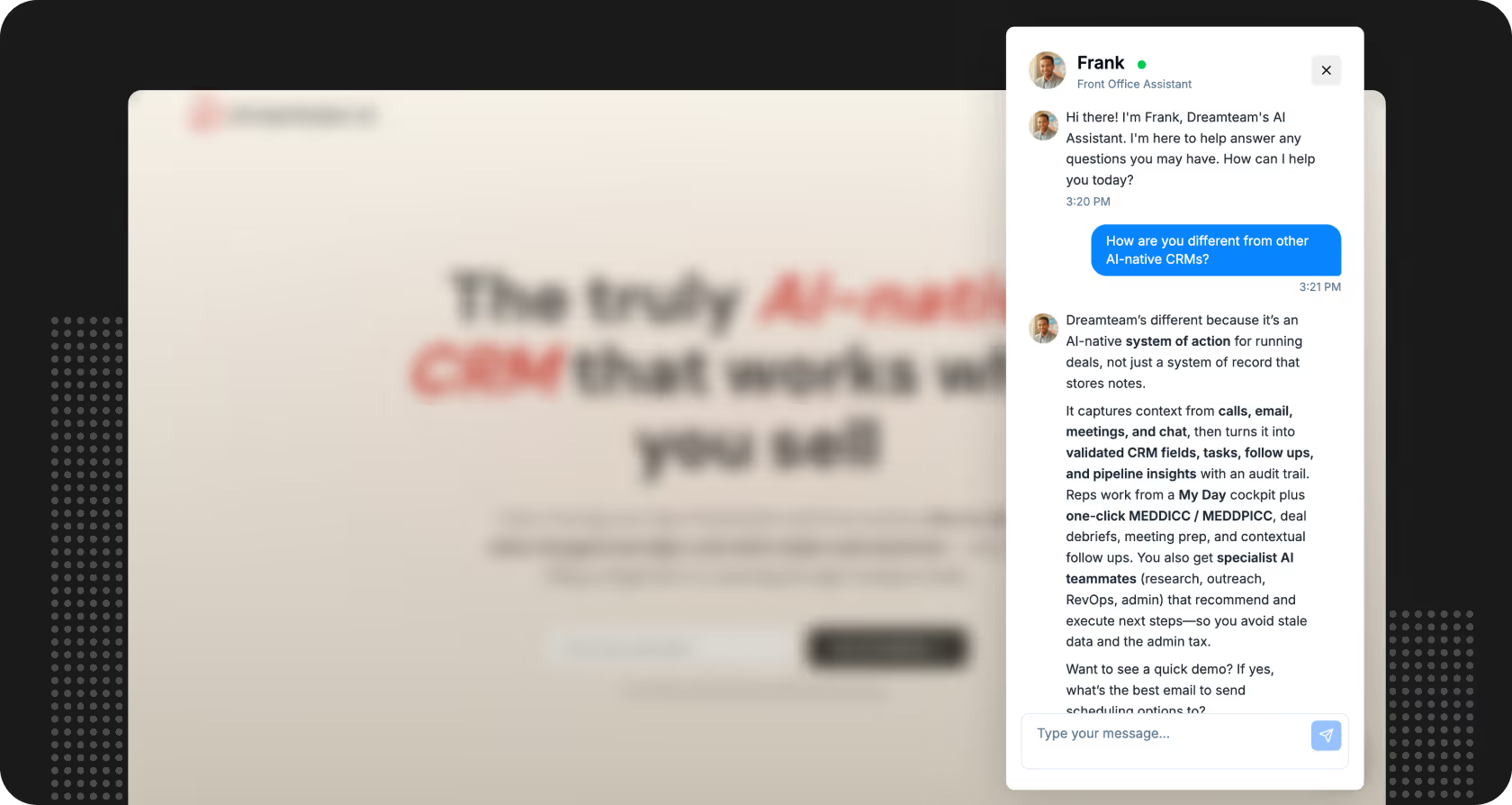
Frank
Front Office
Turns website visitors into qualified pipeline before a rep ever sees them. He engages, captures contact details, and qualifies leads automatically.
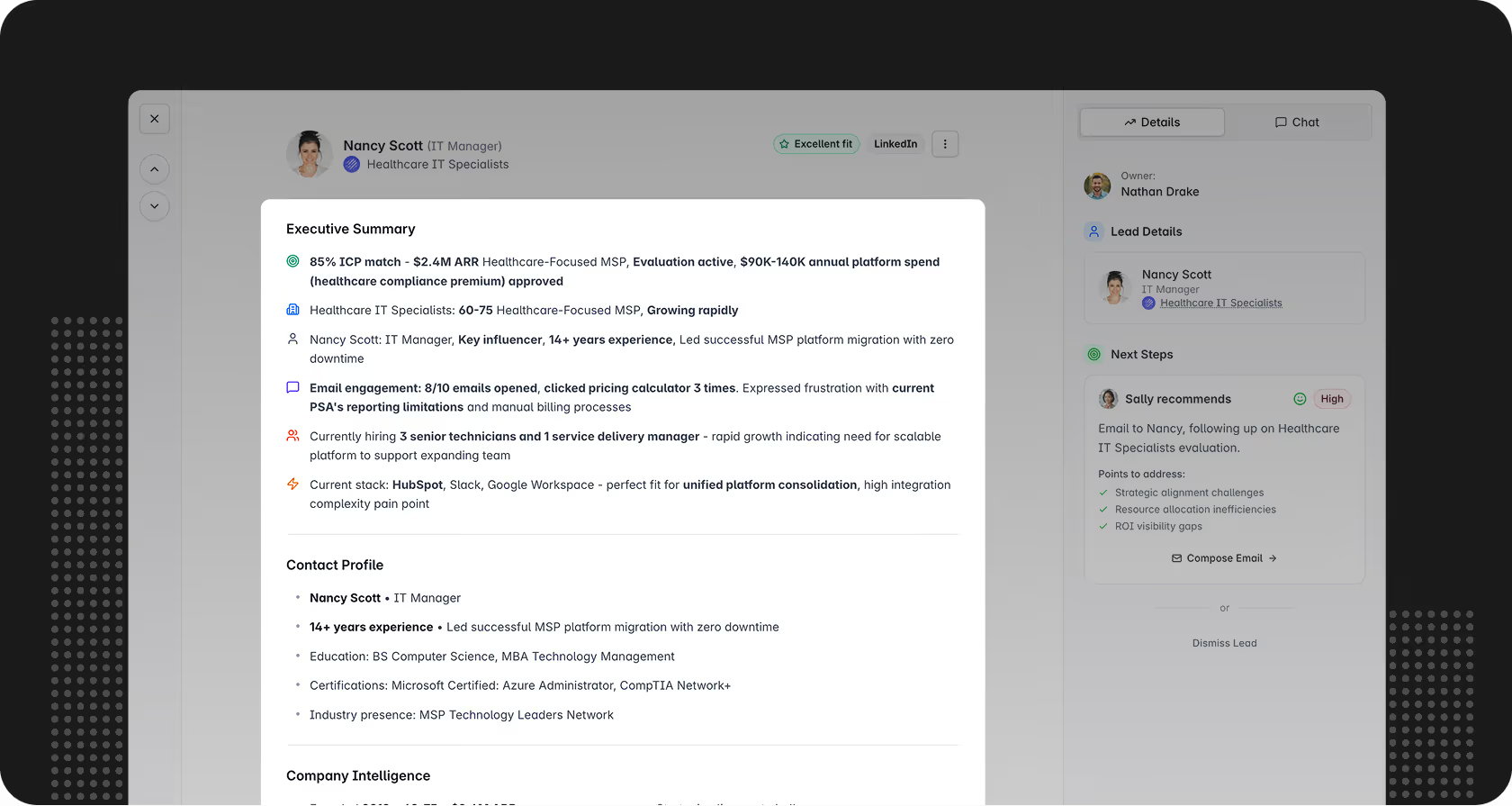
Rachel
Research Assistant
Researches every prospect and account before the first call, so your reps never walk into a cold room. Pre-built briefs waiting for your reps, not generated on demand.
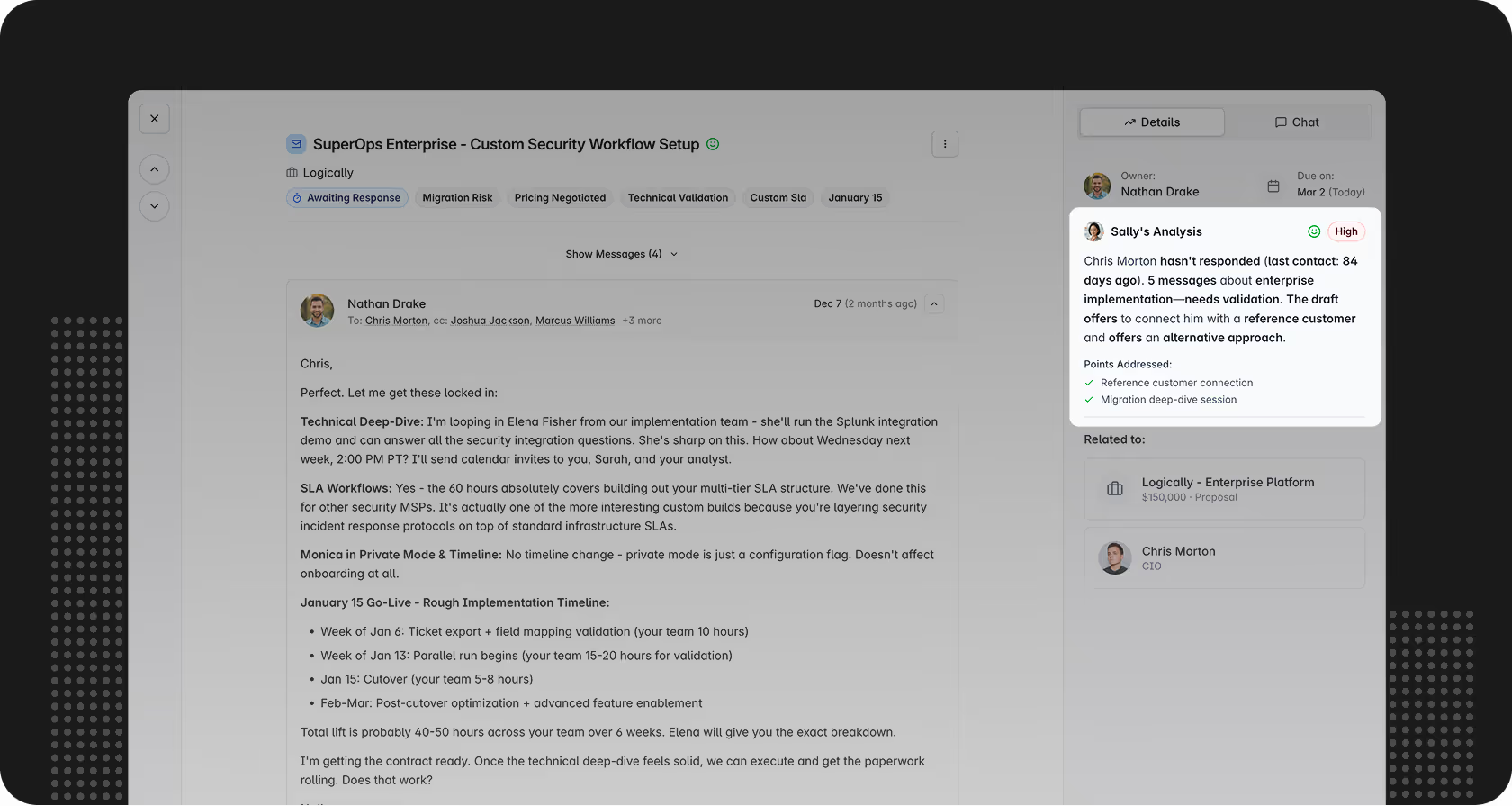
Sally
Sales Assistant
Monitors your entire pipeline while your reps are selling. By Monday morning, you already know which deals need attention this week. Picks up buying signals reps missed
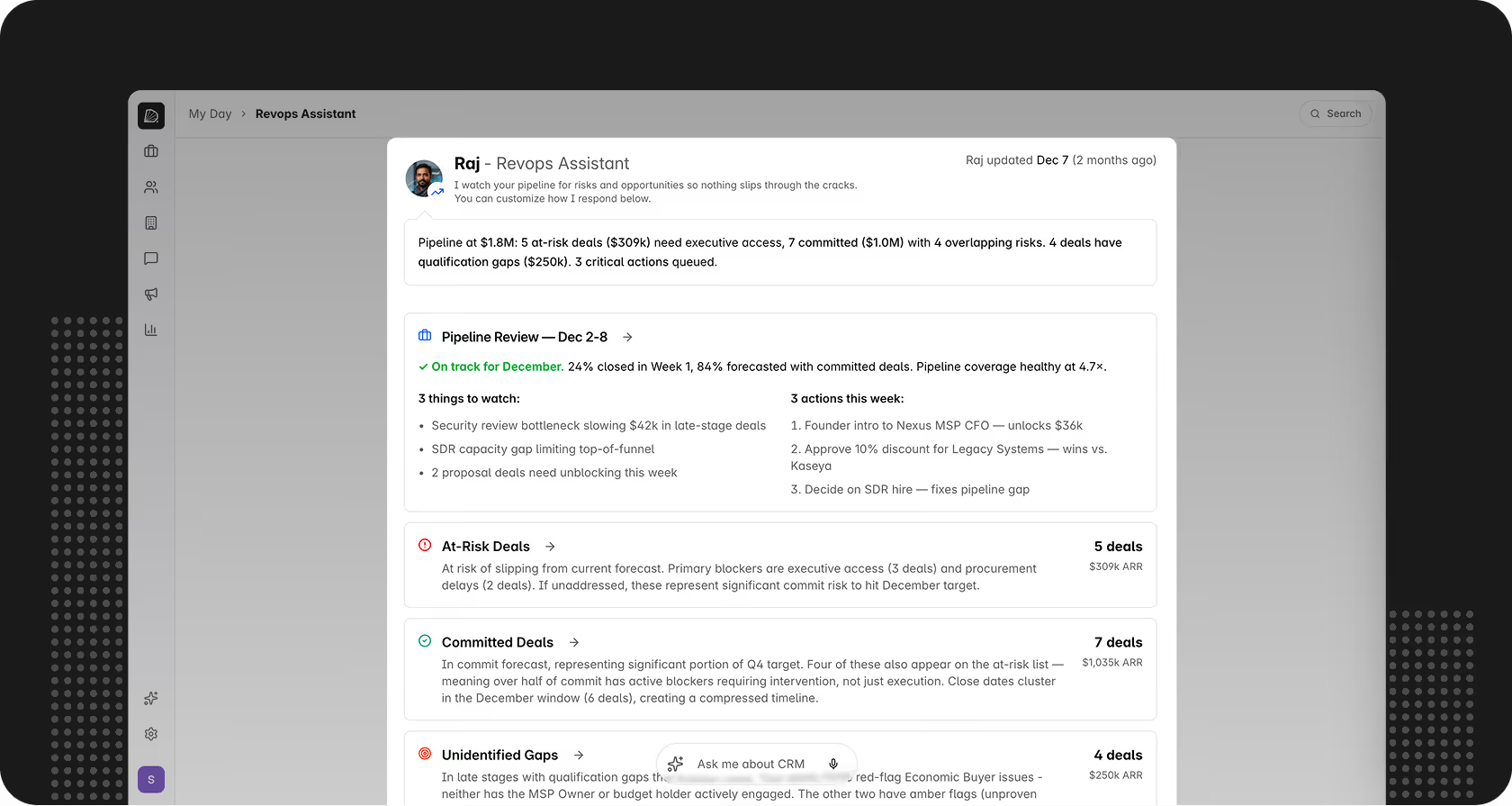
Raj
RevOps Assistant
Turns your pipeline into a forward-looking instrument. No filter-building. No SQL queries. Just answers. Doesn't just report stage conversion anomalies - he explains them
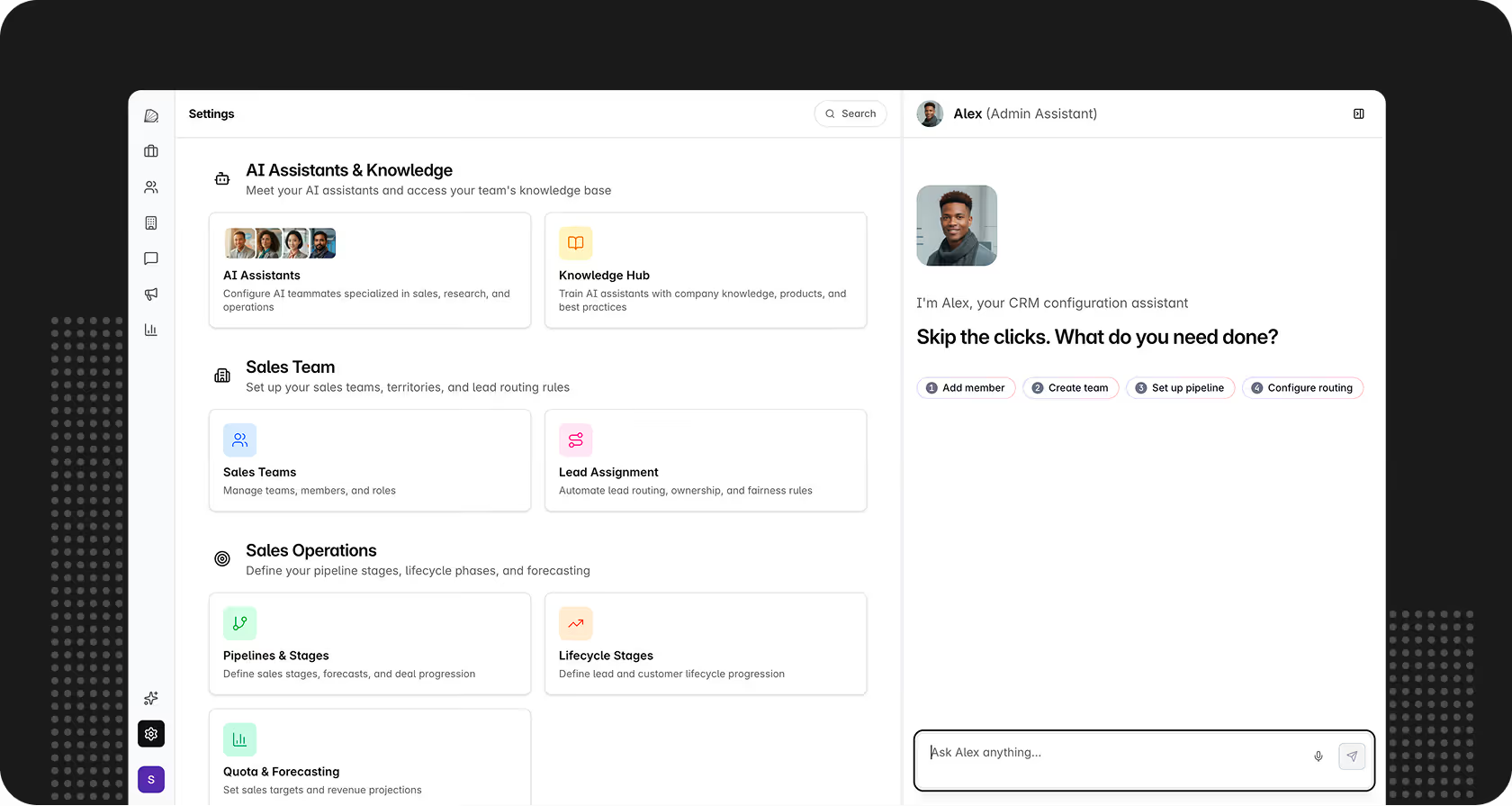
Alex
CRM Admin
Configures your entire CRM through conversation. Pipelines, routing rules, territories - set up in minutes, in plain English. No implementation consultants. No tickets. No waiting.
AI for lead qualificationDashboard profile summary for Nancy Scott, IT Manager at Healthcare IT Specialists, showing executive summary, contact profile, company intelligence, and next steps details.

Pipedrive vs. Dreamteam

Feature
Pipedrive
Dreamteam
Setup time
1–2 weeks
1–2 weeks i Alex, our CRM admin agent, configures your pipeline through plain English — no consultants, no workflow builders.
Data entry
Forms
Conversation i Say "Create a deal for Acme Corp at $45K closing next quarter" and it's done. Emails, calls, and meetings are captured automatically — no forms, no manual logging required.
AI agents
Single-purpose only i Pipedrive has an AI Sales Assistant and "Agentic AI" for call summaries — single-purpose tools, not autonomous specialist agents working across your pipeline.
5 specialists i Rachel (research), Sally (pipeline), Raj (RevOps), Frank (inbound), Alex (CRM admin) — each covers a defined domain, not a single generic chatbot.
Conversation intelligence
Call summaries only i Pipedrive's "Agentic AI" generates call and meeting summaries. It doesn't surface deal risks, flag stalled opportunities, or connect conversation signals to pipeline health.
Yes i Every call and meeting is captured and summarised automatically. Every insight traces back to the specific email, meeting, or call it came from — click to verify, no black box.
Proactive deal guidance
No
Yes i Pipedrive reports on pipeline state. Sally tells you what to do about it — which stalled deals need attention, what the next action is, and why.
Inbound AI assistant
No
Yes i Pipedrive has no inbound AI layer. Frank qualifies and captures leads from your website before a rep is ever needed.
Advanced features
Locked behind tiers
Everything in base plan i On Pipedrive: AI Sales Assistant starts at Professional. Automations require Advanced. Email sync limited below Professional. Reporting gated by tier. Dreamteam includes all of it in the base plan.
COMMON QUESTIONS

Questions we hear
a lot

What's the best Pipedrive alternative for a growing sales team?

You want three things from a Pipedrive replacement: flat pricing that includes the features you actually use, a pipeline that reflects real conversations instead of rep input, and specialist AI agents instead of one generic chatbot. Dreamteam ships all three in the base plan. Built for teams that outgrew the simple pipeline tool but don't need a $50K/month enterprise suite.

How long does it take to migrate from Pipedrive?

Teams are fully live in 1-2 weeks. Contacts, deal history and pipeline stages transfer automatically, and your open deals don't pause during the move. Alex, our CRM admin agent, handles setup through plain-English conversation - you describe how your sales process runs, he configures it.

Will my sales reps actually use it?

The interface is familiar - pipeline views, deal cards, contacts, accounts - so there's no new tool to learn. What changes is that calls, emails and meetings are captured automatically, so the form-filling disappears. Your reps resent feeding a system. They don't resent one that feeds them.

Our Pipedrive runs on custom fields, external tools and side-spreadsheets. Will Dreamteam need the same workarounds?

No. The workarounds pile up because Pipedrive tops out at pipeline basics - every new process needs a bolt-on. Dreamteam handles complexity through conversation with Alex, our CRM admin agent. "Add a qualified stage before MQL" or "route SMB deals to Sarah" takes a sentence, not a settings project. Custom fields, workflow branches and cross-team handoffs work in the base plan without external glue.

What makes Dreamteam different from other AI CRMs?

In other AI CRMs, the AI is a feature bolted onto a traditional pipeline tool. In Dreamteam, the agents are the product - five specialists that actually run your pipeline while the CRM quietly keeps up. Every insight they surface traces back to the call, email or meeting it came from.

Pipedrive reports are so basic we end up in Excel. Are Dreamteam's any better?

You won't need Excel. Raj, our RevOps agent, scores every deal across five health factors, tracks forecast accuracy and stage conversion, and hands you a weekly manager brief already written. It's all in the base plan - no reporting tier, no BI tool to bolt on, no dashboards to hand-craft. The forecast is built from actual call content, not from what got typed into a form.

The timing never feels right to switch. When does it actually make sense to move?

The moment most teams move is the moment they realise manual logging has already cost them - a deal that went cold and nobody saw it coming, or a rep who left and took context that was never in the CRM. If you've had that moment, the timing is now. If you haven't yet, waiting for it is the expensive choice.

Ready to make the switch?

Your pipeline deserves
better than hope.

If you're hitting Pipedrive's ceiling, book a 30-minute demo. In 15 minutes, you'll see what your pipeline looks like with every call, email and meeting captured automatically.

Thank you for your submission!

Oops! Something went wrong while submitting the form.
No credit card. No commitment. Piperdrive migration support included.